
SmartTaste AI
.png)
Transforming an AI Nutrition App into an AI Nutrition Operating System that revolutionize how individuals interact with their daily nutrition and diet.
How i used vibe coding, system thinking, and AI-assisted exploration to design a nutritional app for real world problems who can not afford personal nutrition coaches.

My Role
I functioned as both the lead product design leader and developer to build an AI-powered nutrition platform. I managed the full design stack—research, synthesis, low-to-mid fidelity wireframing, interactive prototyping, and develop the application using AI.
AI-Augmented Development: Rather than following traditional, slow development cycles, I utilized an AI-first workflow. By integrating tools like ChatGPT, Figma, Stitch, Google AI Studio and Cursor, I accelerated the UI development and coding process in Android studio and Xcode. This allowed me to focus on 'Human-AI Interaction' (HAII) principles, ensuring that the AI components felt seamless and accessible to the end user.
Overview
SmartTaste AI is an intelligent personal nutritionist application designed to revolutionize how individuals interact with their daily nutrition. Powered by advanced AI, the platform provides deep nutritional insights and hyper-personalized meal planning to help users make smarter, data-driven dietary choices.
Core Features & Capabilities
-
Hyper-Personalized Meal Planning: Generates dynamic daily food plans tailored strictly to individual user goals.
-
Deep Ingredient & Flavor Analysis: Utilizes advanced AI to break down complex ingredient lists, nutritional details, and flavor profiles.
-
Frictionless Health Tracking: Seamlessly monitors daily calorie intake and macro/micronutrient distribution.
-
Ask anything: Delivers responses about any questions on nutrition.
-
Cross-Platform Accessibility: Built and optimized for native experiences on both iOS and Android.
The background for AI Detection Challenges and Solution
SmartTaste AI was created to identify food and drinks from a photo and provide instant nutritional insights. During development, we discovered that AI cannot always accurately identify every ingredient, portion size, or beverage composition. To improve accuracy, we introduced an Edit feature that allows users to correct and refine AI results.
Food and drink analysis is particularly challenging because ingredients can be hidden, serving sizes are difficult to estimate from images, and beverages often contain invisible components such as sugar, syrups, milk, or alcohol. These factors can significantly impact nutritional calculations.
To overcome these limitations, SmartTaste AI combines image recognition with user feedback and contextual input. This collaborative approach helps the AI learn over time, improve accuracy, and provide more reliable nutritional insights.

The Challenge
When I first evaluated SmartTaste AI, I saw a product with strong foundations but an increasingly common problem.
The application already offered personalized meal planning, calorie tracking, nutritional analysis, and an AI-powered assistant. However, after studying user behavior and the competitive landscape, a larger question emerged:
Was SmartTaste AI helping users track food, or was it helping them decide what to eat?
The distinction was important.
Most nutrition applications excelled at documenting decisions that users had already made. Very few helped users make those decisions in the first place.
Users weren't struggling to count calories.
They were struggling with everyday questions:
-
"What can I cook tonight?"
-
"What should I eat for breakfast tomorrow?"
-
"Where should I go for lunch?"
-
"What can I make with the ingredients I already have?"
The more I explored the market, the clearer the opportunity became.
Getting to know the business goal
First, I held a kickoff meeting with the business owners and product stakeholders to gain a clear understanding of the product vision, business goals, and overall requirements for the SmartTaste AI application. This meeting helped me understand both the user needs and the business objectives behind the project.
The stakeholders wanted to design and deploy both iOS and Android applications targeted at users who are looking to adopt a healthier lifestyle. During the discussions, I gathered valuable insights into the business strategy, product expectations, and future vision for the platform.
The primary business goal was to rapidly design and develop an MVP so real users could begin testing the application as quickly as possible. The long-term vision of SmartTaste AI is to create a personalized nutrition app that helps millions of users better understand their food and drink choices, encouraging healthier habits and smarter daily decisions.
The app aims to provide users with intelligent recommendations and insights that support healthier eating and drinking behaviors through an accessible and user-friendly mobile experience.

.png)


Discovering the Gap
I conducted extensive AI-assisted market research and competitive analysis across leading nutrition platforms including Cal AI, Yuka, and MyFitnessPal.
Each product solved a different part of the nutrition journey:
-
Cal AI focused on identifying and tracking food.
-
Yuka focused on product and ingredient health analysis.
-
MyFitnessPal focused on logging and monitoring nutrition.
But none of them truly understood a user's kitchen, habits, goals, or context.
More importantly, none behaved like a real nutritionist.
Most interactions remained transactional.
Users asked questions.
The system answered.
The conversation ended.
What I discovered was a significant opportunity to reposition SmartTaste AI from a nutrition tracker into something much larger:
An AI Nutrition Operating System.
A platform capable of understanding not only food, but also the person consuming it.


Competator incites
I have got a great incites where the opportunity lies and where i can improve.
Current apps solve only one piece of the problem:
-
Cal AI → "What am I eating?"
-
Yuka → "Is this product healthy?"
-
MyFitnessPal → "Track everything manually."
And here is the opportunity that i will create SmartTaste AI can as the AI Nutrition Operating System.
Another gap is that no Competitor Understands the user Kitchen and the proposed 'Scan Your Fridge' feature is a major differentiator.
A user takes one photo and receives:
-
Available ingredients
-
Missing ingredients
-
Meal plan and idea
-
Cooking instructions
-
Nutrition breakdown
None of the major competitors currently offer twhat is planned. since there is No Real AI Nutritionist The AI nutritionist that knows me to answer questions like
-
"Where should I eat lunch?"
-
"What should I make with what's in my fridge?"
The system should use:
-
Previous conversations
-
Food preferences
-
Health goals
-
Restaurant history
-
Meal history
-
User behavior
to create recommendations that feel genuinely personal.
Target audience
SmartTaste AI is designed for a broad range of health-conscious users, from ages 13 to 65, who want a simple and accessible way to improve their nutrition and make better food choices. The platform is built for anyone with a smartphone who is looking for personalized guidance on what to eat and drink throughout the day.
For this project, the primary target audience is food-curious individuals, particularly young professionals who often find themselves standing in front of an open fridge feeling overwhelmed, frustrated, or unsure about what to cook or eat. They are looking for quick, personalized recommendations that help them make decisions without spending time searching for recipes or meal ideas.
The product also appeals to digitally savvy users who are already comfortable using AI-powered tools and chatbots. Similar to how people ask questions in AI assistants such as ChatGPT, these users want a conversational experience that helps them discover meals, understand nutrition, and receive instant recommendations based on their available ingredients and preferences.

Interview Process
To prepare for the SmartTaste AI user research phase, I begin by establishing clear objectives centered around understanding how people manage their dietary habits and holistic health. Preparation involves crafting a semi-structured interview guide with open-ended questions designed to uncover authentic behaviors, frustrations with current tracking tools, and how users naturally define "healthy vs. unhealthy" options. To ensure a comprehensive understanding, I recruits a diverse group of eight target users, ensuring the qualitative insights gathered represent a broad spectrum of lifestyle goals and tech-savviness before any design work begins.
The execution of these sessions is orchestrated entirely around the users' convenience to foster comfort and openness. Utilizing remote collaboration tools, I conduct one-to-one Zoom interviews scheduled flexibly around the participants' availability. To optimize data collection without compromising human connection, the designer collaborates with a co-worker who serves as a dedicated note-taker. This division of labor allows me to focus entirely on engaging the user and probing deeper into their experiences, while the teammate handles session recording, tracks active documentation, and notes non-verbal cues in real time.
During the session, the interview transitions into a tactical usability test and contextual inquiry to observe how users interact with early concept ideas or competitive interfaces. This qualitative feedback is then systematically paired with quantitative analytics to paint a complete picture of the user landscape. While the one-to-one interviews reveal the emotional why behind user frustrations—such as navigating complex grocery lists or wanting specific language support—the numerical data validates the statistical significance of these patterns, ensuring the final feature set is grounded in proven user necessity.
Ultimately, this rigorous synthesis directly shapes the application's information architecture and visual hierarchy.
This empirical foundation guarantees that the upcoming design phase solves genuine user pain points with a highly tailored, intuitive interface.
Interview questions
SmartTaste AI: User Interview Guide
1. Introduction & Device Setup (Warm-up)
Goal: Build rapport, understand their tech ecosystem, and set expectations.
-
"To start off, what smartphone do you currently use as your primary device? (iOS or Android?)"
-
"In general, how often do you use your phone throughout the day, and what are the 2 or 3 apps you open the most?"
-
Follow-up: "How often do you use your smartphone specifically for cooking or meal preparation purposes? (e.g., looking up recipes, watching cooking videos, tracking groceries)."
2. Dietary & Hydration Habits (Behavioral Patterns)
Goal: Understand the user’s daily routine, baseline behaviors, and relationships with food/drinks.
-
"Walk me through a typical day for you: How often do you eat and drink in a single day, and what types of food and drink do you typically consume?"
-
Follow-up: "How do you currently decide what is 'healthy' versus 'unhealthy' when you buy groceries or order out?"
-
Follow-up: "How much attention do you pay to the liquid calories or ingredients in the beverages you drink throughout the day?"
3. Pain Points, Challenges, & Desired Changes (The "Why")
Goal: Uncover core frustrations, motivations, and areas where the user actively wants to improve.
-
"If you look at your current eating and drinking habits, do you face any specific challenges or frustrations?"
-
"Is there anything about your current diet or nutrition that you actively want to change?"
-
Follow-up: "What specific changes or improvements do you need to see in your eating and drinking habits to feel like you are living a healthier lifestyle?"
-
Follow-up: "What has stopped or blocked you from making those changes in the past?"
4. Competitive Experience & Feature Deep-Dive (Mental Models)
Goal: Gauge familiarity with existing tracking solutions and test reactions to SmartTaste AI’s core pillars.
-
"Have you ever used an application that tells you the details of your food and drink, or counts your calories? If yes, which one, and what was your experience like?"
-
Follow-up: "What did you like about it, and what made you stop using it or feel frustrated by it?"
-
Follow-up: "If you could simply take a photo of your food or drink to instantly get nutritional tips and exercise equivalents, how would that fit into your daily routine?"
-
Follow-up: "How important is it for you to have an app like this available in a specific language other than English (for example, Amharic or others) to share with family or use comfortably?"
User Persona


User onboarding flow

Emphathy map

A New Vision
The product vision became clear.
Instead of building a better calorie counter, SmartTaste AI would become the first platform to combine:
-
Fridge understanding through computer vision
-
Personalized meal planning
-
Recipe generation
-
Grocery intelligence
-
Restaurant recommendations
-
Long-term nutrition coaching
-
Conversational memory
This vision led to two major feature innovations that would redefine the experience.
Major redesign updates to SmartTaste AI: "Scan Your Fridge" feature that generates an instant meal plan, complete with recipes, ingredients, cooking times, preparation steps, and tailored recommendations from just a photo of the user's fridge. And an enhanced personalized conversational chatbot that feels completely natural, acting like a professional nutritionist. By leveraging conversational history, behavior, and individual needs, the chatbot will provide highly tailored recommendations for questions like "Where should I eat lunch?" or "What should I have for breakfast tomorrow?"

Information Archtecture

User Journey

Enhancement 01
Scan Your Fridge
The most exciting insight from research was surprisingly simple:
People often have food available, but they don't know what to do with it.
Users would open their refrigerators full of ingredients and still ask:
"What should I eat?"
Rather than forcing users to manually search recipes, enter ingredients, or browse meal plans, I wanted the experience to start with the real-world environment around them.
The solution became Scan Your Fridge.
With a single photo, SmartTaste AI could:
-
Identify available ingredients
-
Detect missing ingredients
-
Generate personalized meal recommendations
-
Create complete recipes
-
Provide cooking instructions
-
Calculate nutritional values
-
Continue the conversation with tailored coaching
The goal was not simply recipe generation.
The goal was reducing decision fatigue.
Users no longer needed to think about what they could make.
The system would figure it out for them.
One of the Most Important Product Decisions
A critical challenge emerged during the design process:
Where should Scan Your Fridge live inside the application?
Two competing options surfaced.
The first option placed it inside the existing quick-action menu.
While this seemed convenient, it created a usability conflict.
The quick-action menu was designed for logging food and tracking activities.
Scan Your Fridge was fundamentally different.
It was not a logging tool.
It was a discovery tool.
After evaluating multiple solutions and validating them through AI-assisted UX analysis, I made the decision to place the feature inside the Ask Anything experience.
Instead of adding another navigation destination, the feature became a hero card within the conversational AI environment.
This decision accomplished three things:
-
Preserved existing user workflows
-
Increased feature discoverability
-
Strengthened the relationship between scanning and conversation
The experience felt natural.
Users could scan their fridge and immediately continue discussing recommendations with their AI nutritionist.
The feature became part of a larger conversation rather than a standalone utility.
Building Trust Through Transparency
Another important insight emerged during usability testing.
Users wanted confidence in what the AI detected.
Instead of jumping directly from photo to recipe recommendations, I introduced an ingredient recognition and confirmation step.
This gave users visibility into what the AI understood before recommendations were generated.
The result was higher trust, improved recommendation accuracy, and stronger engagement.

Enhancement 02
Creating a Real AI Nutritionist
The second challenge was even bigger.
Most nutrition chatbots answer questions.
Very few actually know the person asking them.
I wanted SmartTaste AI to feel less like a chatbot and more like a professional nutritionist who remembers every conversation.
The enhanced AI Nutritionist was designed around a simple principle:
Every recommendation should become more intelligent over time.
Rather than generating generic responses, the assistant would consider:
-
Health goals
-
Dietary restrictions
-
Allergies
-
Food preferences
-
Meal history
-
Restaurant choices
-
Previous conversations
-
Behavioral patterns
This transformed the quality of interactions.
Questions such as:
"Where should I eat lunch?"
or
"What should I have for breakfast tomorrow?"
were no longer treated as simple prompts.
They became contextual conversations.
The system understood the user's history and generated recommendations that reflected who they were, not just what they asked.
The result was a far more human experience.
AI Accuracy challenge
SmartTaste AI was originally designed to identify food and drinks from a photo and provide nutritional insights. During the design and development process, we recognized that AI cannot always accurately identify every ingredient, portion size, or beverage composition. To solve this challenge, we introduced an Edit feature that allows users to correct and refine AI results, helping improve accuracy while creating a more reliable and personalized experience.
The biggest challenges for AI food and drink detection are hidden ingredients, volume estimation, and ingredient identification. Drinks are particularly difficult because ingredients such as sugar, syrups, milk, and alcohol are often invisible in a photo, while different container sizes and camera angles can affect volume calculations. A single image cannot always determine exactly what is inside a beverage.
To address these limitations, SmartTaste AI uses a combination of image recognition, user feedback, and contextual input. By allowing users to edit results and provide additional information, the system can achieve significantly higher accuracy and deliver more trustworthy nutritional insights over time.


Designing for Long-Term Relationships
A major product decision involved how generated meals should behave after creation.
Should recommendations disappear after viewing?
Should they automatically become tracked meals?
Or should users have flexibility?
I chose a hybrid approach.
Generated recommendations would automatically save into conversation history, while users could independently decide whether to add them to their daily nutrition log.
This gave users complete control while maintaining continuity within the AI experience.
The decision aligned with a larger product philosophy:
Users should never feel forced into tracking.
Tracking should feel like a natural extension of discovery.

Defining Sustainable Usage
Another strategic challenge involved feature access.
Because fridge analysis requires significantly more AI processing than traditional chat interactions, usage limits needed careful consideration.
After evaluating engagement patterns and business goals, I established a dedicated scanning model:
-
Five fridge scans per day for premium users
-
Separate from chatbot request limits
-
Additional recommendations generated from the same image count toward usage
-
Follow-up conversations remain unlimited
This balanced user value, technical scalability, and monetization opportunities without disrupting the overall experience.


Design and Product Decisions
1. Placement of the "Scan Your Fridge" Feature
The first major design and development decision was determining the optimal placement of the Scan Your Fridge feature within the application's information architecture.
Several placement options were considered, including:
-
Adding it to the main bottom navigation bar.
-
Placing it under the "+" action menu alongside Voice, Camera, and Text input.
-
Integrating it within the Ask Anything screen.
-
Creating a dedicated button inside the My Plan / My Schedule / Meal Planner section.
After carefully analyzing the options and reviewing detailed recommendations from both ChatGPT and Gemini, I decided to keep Scan Your Fridge within the Ask Anything screen. The feature will be presented in its own dedicated card with clear visual hierarchy.
This approach provides the best balance between discoverability, usability, and interface simplicity. It allows users to easily find the feature without disrupting the clean design of the application or adding unnecessary complexity to the primary navigation.
2. Meal Result Flow and Information Architecture
The second major decision focused on determining where AI-generated meal recommendations should be stored after they are created.
The initial challenge was deciding whether generated meals should be:
-
Stored only in Ask History, or
-
Added to the user's Daily Log / Logged Items section.
This created an information architecture conflict between the existing Ask History and Logged Items experiences.
Final Decision: Support Both Workflows
The solution is to support both Ask History and an optional Daily Log action.
User Flow
-
Selecting Done saves the generated meal to Ask History and navigates the user to the Ask History screen (existing behavior remains unchanged).
-
Add to My Daily Log is available as a secondary action on the results screen.
-
This action reuses contextAddEntry() to add the meal to the Dashboard's Recently Added section.
-
Users can:
-
Save the meal to history only.
-
Add the meal to their daily log only.
-
Do both.
-
Do neither.
-
This functionality has been moved into Phase 1 and removed from the original Phase 4 polish phase.
3. Fridge Scan Usage Limits
Another important product decision was determining how many fridge scans users should receive per day, month, or year.
After conducting a comprehensive analysis using both ChatGPT and Gemini, I decided to implement the following model:
Premium Plan Scan Limits
-
5 fridge scans per user per calendar day.
-
Scan count resets automatically at the user's local midnight.
-
This limit is completely separate from the existing Ask Chat limit of 20 requests per hour.
What Counts as a Scan
The following actions count toward the daily scan limit:
-
Initial fridge scan.
-
Each "Another Recommendation" request generated from the same photo.
What Does Not Count
The following actions do not consume additional scans:
-
Fix Results refinements.
-
Follow-up text conversations on the results screen.
-
Questions related to an already generated scan result.
User Experience
-
Scan limits are checked before the camera opens.
-
The Scan Now button becomes disabled when the daily limit has been reached.
-
A remaining-scan banner is displayed when the user has two or fewer scans remaining, similar to the existing Ask rate-limit experience.
Technical Implementation
Recommended persistence strategy:
-
Capacitor Preferences for local storage.
-
Firestore for cross-device synchronization and limit enforcement.


Visual Solutions


SmartTaste AI – UX Usability Testing
Overall Assessment
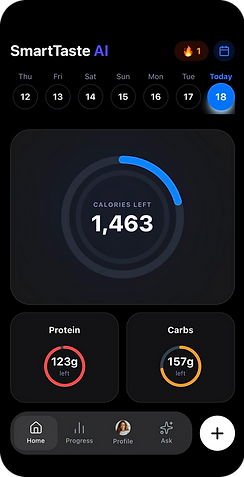
The design is visually strong, modern, and easy to navigate. The Scan My Fridge experience is intuitive and engaging, while the Home screen currently feels more like a calorie tracker than an AI nutrition assistant.
Overall Scores
-
Visual Design: 9/10
-
Usability: 8/10
-
Navigation: 8/10
-
AI Differentiation: 6/10
-
Personalization: 5/10
-
MVP Readiness: 8/10
Key Findings
1. Home Screen Needs Stronger AI Positioning
Current hierarchy prioritizes:
-
Calories
-
Nutrition tracking
Users may perceive the app as another calorie-tracking solution similar to MyFitnessPal.
Recommended hierarchy:
-
Ask AI
-
Scan My Fridge
-
Personalized Recommendations
-
Calories & Nutrition Tracking
2. Scan My Fridge Flow Performs Well
Strengths:
-
Clear purpose
-
Easy to understand
-
High engagement potential
Improvements:
-
Use an actual refrigerator image instead of a prepared meal.
-
Add value-focused messaging:
"Take one photo and get personalized meals in seconds."
3. Missing Ingredient Detection Step
Current flow:
Scan → Recipe Ideas
Recommended flow:
Scan → Ingredient Detection → Ingredient Confirmation → Recipe Recommendations
Benefits:
-
Increases trust in AI
-
Allows correction of detected ingredients
-
Improves recommendation accuracy
4. Recipe Recommendations Need Explanations
Current:
-
96% Match
Recommended:
-
96% Match
-
Uses ingredients already in your fridge
-
Supports weight-loss goal
-
High-protein option
This helps users understand why recommendations are personalized.
Priority Improvements
P0 (Before Development)
-
Reorganize Home screen around AI and Fridge Scan.
-
Add Ingredient Detection and Confirmation screens.
-
Add recommendation explanations.
P1
-
Add “What Should I Eat Today?” AI card on Home.
-
Add daily personalized meal recommendations.
-
Add direct Scan My Fridge shortcut from Home.
P2
-
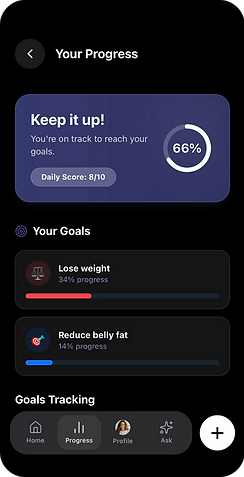
Add nutrition insights and goal progress explanations.
-
Add recipe variations (high-protein, low-carb, vegetarian).
Conclusion
The strongest differentiator for SmartTaste AI is not calorie tracking—it is the combination of:
-
AI Nutritionist
-
Scan My Fridge
-
Personalized Meal Recommendations
To maximize user adoption and stand out from competitors, these features should become the primary focus of the Home experience and recommendation flow.
Major AI tools
Google AI Studio
ChatGPT
Cursor
Gemini
Figma AI
Usability Testing & Iterative Refinement
Placing an interactive prototype into the hands of real users is the most effective way to validate what works and identify areas for improvement early in the design cycle.
I conducted moderated usability testing sessions with 10 participants via Zoom. During these sessions, I closely observed how users interacted with the interface, listened to their real-time feedback, and documented their behavior. This phase was crucial for gaining deep user empathy and uncovering critical friction points.
Our design process was entirely iterative. By synthesizing user feedback and mapping key pain points, we transformed user frustrations into actionable design solutions. Every major update—from core functionality to new features—was directly driven by participant insights, ensuring the application evolved around real-world needs. All interview data, recordings, and insights were systematically organized into a centralized repository for continuous reference.
Key Design Updates Based on User Feedback
The insights gathered from testing were immense and directly shaped the final pre-production design:
-
Gamification & Motivation: Added a Badge Section directly above the daily meal plan to reward healthy habits and increase user retention.
-
Onboarding & Personalization: Introduced Informational Onboarding Screens and Multi-Language Support to improve accessibility and ease users into the ecosystem.
-
Meal Planning Depth: Integrated a One-Week Grocery List within the daily food and drink tracker, alongside detailed Preparation Methods and Cook Times for all daily meals.
-
Optimized Logging Flow: Originally, scanned items were automatically sent to the "Recently Added" section. To give users more control, I updated this flow with a Dual-Action Prompt:
-
Option 1: Add to the "Recently Added" section to automatically log and deduct the calories from their daily goal.
-
Option 2: Tap "Done" to dismiss the item without logging it.
-
-
AI Accuracy Control: Added a dedicated feature allowing users to manually correct AI scan results if the automated nutritional data is inaccurate.
-
Smart Alternatives: Direct feedback regarding dietary frustrations led to the inclusion of an AI-driven alternative engine, which suggests healthier food and drink options whenever a user scans a poorly rated item.
Accessibility
I have intentionally integrated accessibility principles into every part of SmartTasteAI so it can be used by people with disabilities as well as by all users equally. The ablity to use the voice functionality, Color contrast and placement together with content follow detail oriented information architecture support text and support icons are among the consideration of SmartTaste AI. Therefore content can be easily seen or heard, navigation supports touch, type, or voice, instructions and language are clear and simple, and compatible with a wide range of assistive technologies
To support these goals, SmartTasteAI includes features such as text input, voice input, and clearly visible UI elements, accessible text sizes, high color contrast, focus states, grouped content, and multiple visible indicators to ensure everyone can use the product comfortably.
Measuring Success
The impact of the redesign validated the strategy.
By shifting SmartTaste AI from a nutrition tracking tool toward an intelligent decision-making platform, user engagement increased significantly.
Following the launch of the redesigned experience:
-
New user acquisition increased by 30%
-
Conversion rates improved by 40%
-
User engagement with AI-powered features increased substantially
-
Scan Your Fridge became one of the most differentiated experiences in the product
Most importantly, users began interacting with SmartTaste AI differently.
Instead of opening the app to log food, they opened it to make decisions.
That behavioral shift represented the true success of the project.
Reflection
This project taught me that the future of nutrition technology is not better tracking.
It is better guidance.
The biggest opportunity was never building another calorie counter.
It was creating an AI companion capable of understanding a user's kitchen, goals, preferences, habits, and context—and transforming all of that information into meaningful, actionable recommendations.
Through the introduction of Scan Your Fridge and a deeply personalized AI Nutritionist, SmartTaste AI evolved from a nutrition application into a proactive wellness companion that helps users answer one of the most common daily questions:
"What should I eat next?"
.png)

.png)
.png)

