SmartTaste AI

Project name - SmartTaste AI
Role - AI UX Designer, AI Engineer
AI Tools - ChatGPT, Figma Make , Stitch, Google AI Studio, Gemini, Cursor, Xcode
Note- The brand name DrinklyAI has been updated to SmartTaste AI.
Project date - Nov, 2025


To comply with my non-disclosure agreement, I have omitted and obfuscated confidential information in this case study. The information in this case study is my own and does not necessarily reflect the views of SmartTaste AI.

My role
I led the AI design and development of SmartTaste AI. I solve problems for DrinklyAI by designing and building experiences with AI. I am one of the two AI UX designers team with two engineers, I am the designer as well as the developer- . On this specific project I did most of the UX/UI design process including research to understand the problem, define the research results, sketching, create low and medium wireframes, Visual design, prototype and mockups. More over I have created the entire UI using AI tools including ChatGPT, Figma make , Stitch, Google AI Studio, Giminai, Cursor, Xcode and more
As someone who can build better with a better human experience leveraging AI, I build real usable products and more human centered experiences that people actually uses. I use UX principles and Rapid prototyping with AI tools and prompt engineering in developing a real application.


Project goal
This project focuses on designing the DrinklyAI app for IOS. The app is fully designed and created using AI. We have used most of the applicable AI products and tools for this project to enhance overall user experience of the application. The primary goals of the this project is to create the application in time effective manner so it can be deployed quickly and tested by real users fast so we can enhance the redesign to increase customer satisfaction, attract users, and deliver a great app that can be used by millions of users.

Overview
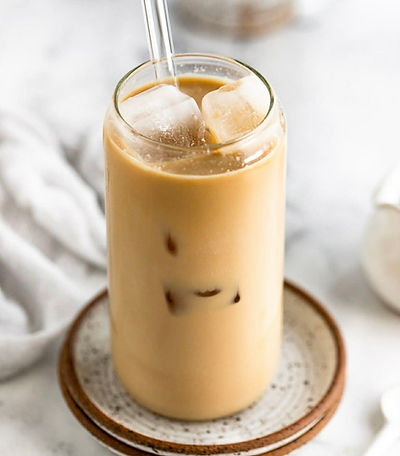
DrinklyAI is an IOS app , It is an app primarily serves all people on their drinking needs.
DrinklyAI is a beverage assistant that uses advanced AI to help you understand your
drinks better—analyzing ingredients, flavor profiles, and nutritional details so you can
make smarter, more informed choices.
Case Study Design
Particularly for this case study i have added prototypes designs for IOS which uses the Human Interface Guidelines (HIG).
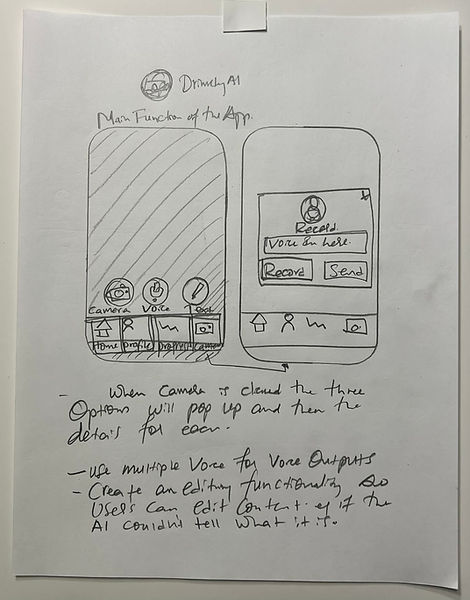
Sketching and Paper Prototype
The first step after a simple crazy sketches was to draw this paper prototype on the selected idea, keeping the brand identity, users need and business goal.


Experience Strategy & Vision
I created frameworks and prototypes to share the vision, design principles and content strategy. This helped to evangelise ideas, gain alignment and drive decision making.
Challenge
The challenge of this project is to consider alcoholic drinks in every step of the application. As alcoholic drink is not allowed under 21 Drinkly Ai has to be careful on this. and me as a user experience designer has to take care of all tis alcohol related designs including restrictions for people under 21. Discovering the pain points of user to enhance user engagement is the main challenge in leveraging AI to the application.
The design process using AI in achieving results with a quick design strategy and implementation.
-
Research
- Data collection
- Survey
- User stories
-
Define
-
Ideate
-
Prototyping
-
Usability test
-
Development

Getting to know the business goal
The business goal is to rapidly design and develop the application so users can test it as quickly as possible. When it comes the business goal is to deliver a great app that helps millions by understanding their drinks. and help users decide what to drink.
Target audience
Target audience for DrinklyAI is anyone who have a mobile phone that can take a picture, voice and text. DrinklyAI is also designed to help for people with vision problems to use a voice record method and for those who like a text communication over a picture.
Understanding the problem
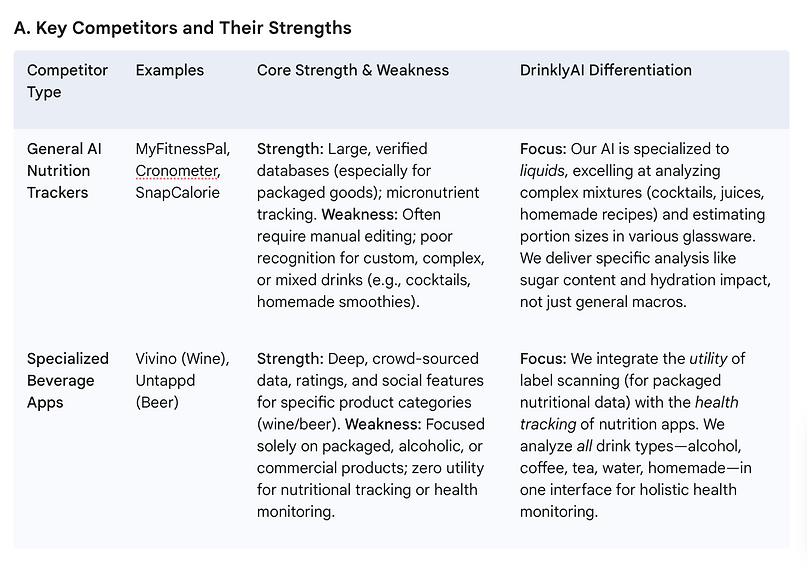
After collecting enough information from the business side analyze existing data and available documentation i conducted a competitive study followed by usability test and interview with 15 users and used analytics on the numerical data.
I have found out that users want simple use of an application, most people do not like to sign up and want to use the application right away, people with disability do not have an option to listen what their drink.
Competitor analysis

Project interview process
Conducted the interview session depending on clients availability, I conducted one-to-one Zoom interview with my co workers who helpd me by taking notes, recording the session and organizing documents.I conducted the interview depending the convenience of my users.
Interview questions include but not limited to;
What are their drinking habits?
What is the device you use ? (Android or IOS)
How users use their smartphone and how often do they use their phone for booking purposes?
Their in drinks and how often do they drink in one day, what do you drink?
If they face any challenge with their drinking habit, is there any thing they want to change ?
What changes do users need to see in their drinking habit?
Have you ever used an application that tells you the details of your drink?
and any relevant followup questions.

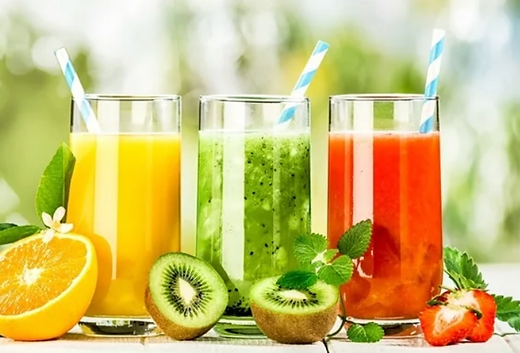
Create Deeper Relationships with Customers
Since Drinkly Ai , Involves on the daily life of may people its important to maintain a great relationship wit the user
Our challenge was to evolve with customers and enter the highly competitive on‐demand food and drink digital industry.
DrinklyAI would offer a limited FREE SCANS for Prime members. With this new benefit we hoped to create deeper relationships with DrinklyAI customers.

Empathy map


Deliver Fast
In favor of speed to market, leveraging AI powered tools and applications we were tasked to design and build within the new design Library.
The assumption was simple—millions of customers will visit everyday.
The quick and early architectural decision had a major impact on the quality of the customer experience we did design and deliver fast.
Define
At this stage i combine all our research findings, Based on the interview i made with, the usability testing in discovering where the problem exists and what challenges user face..
After carefully analyzing the data which has been gathered i combine them for a great solution.
Everyday Challenge
The biggest challenge I faced throughout this project was balancing AI in moving forward with designs, whilst collaborating with the wider team. Since this project touched every person. This was hard.
Managing feedback was even more challenging because it felt like a swinging pendulum of viewpoints. The team spent a disproportional amount of time in creating design decisions.
I was able to manage the team to work together as one.
After deciding on the structure of the website and i created the information architecture to find out how users can interact with the product. Then I came up with a range of crazy ideas where i can have multiple choice to compare and find out the best solution.(and of course discussed with my team)
Information Architecture
Major AI tools used
Google AI Studio
Cursor
Xcode


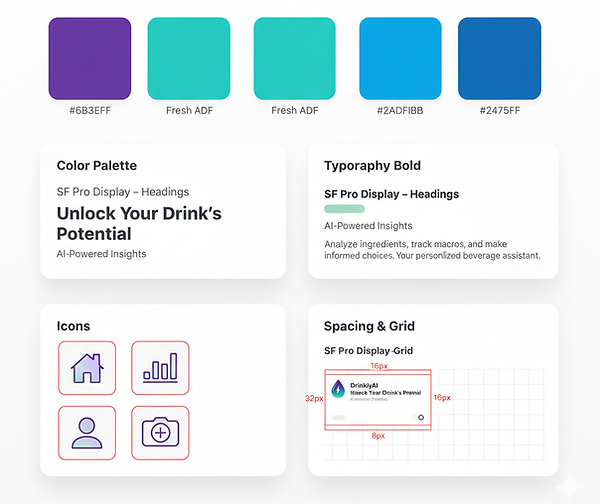
Style guide
Here is the style guide for the visual design system, the typography, color, buttons, icons, interactive state.
The actual style guide hsa more features but i compose this for this presentation purpose.
also I have been aware of the accessibility guidelines and use them in grouping related contents, adding more color contrast, easy to spot text, adding visible indicators on icons and buttons and using different interactive states.



Ideas to action:
I sketched countless ideas and brainstormed various possibilities with my design team and created low-fidelity wireframes and prototypes to test. Even though we took some important aspects from the first design, we came up with the second prototype which is similar but have much more changes, with clear, simple but most importantly meets the experience of our users. I invest significant time in meticulous prompt preparation, which is essential for ensuring seamless implementation, preventing duplication errors, and minimizing post-creation editing time.
Prompting while using AI
I use a clear, practical, and industry-level guide on how to prompt and structure my workflow when developing an DrinklyAI app while using tools like Figma AI, Google AI Studio, OpenAI Chat GPT, Gemini, Cursor. Here is the guideline I use while I prepare my prompt.
1. Complete App Overview & Goal
Define what the app does, who it serves, and what problems it solves.
Prompt focus: clarity of purpose.
2. Define the Architecture
Break the product into modules (e.g., onboarding, scanning, generating, matching).
Prompt focus: each module has its own role + constraints.
3. Create the Design System
Establish tone, voice, colors, UI behaviors, accessibility rules.
Prompt focus: make the model follow consistent language and UI logic.
4. Build a Prompt Template Library (per screen)
For each screen or feature, create reusable prompts.
Prompt focus: structure prompts using role + context + task + output format.
5. Continuously Evaluate Outputs
Test prompts with different scenarios and refine them.
Prompt focus: improve accuracy, clarity, and consistency.
6. Create Global Guidelines for App Behavior
Define how AI should respond across the entire app:
-
tone
-
constraints
-
formatting
-
allowed & not allowed behaviors
Prompt focus: global rules ensure predictable results.
7. Execution Order
Implement prompts in the correct flow:
System prompt
Developer instructions
User prompt
Output formatting
This creates stability and production-ready responses to my workflow.

Prompt
You are an expert full-stack developer and UX engineer. Build a responsive AI-
powered MOBIE application called DrinklyAI, designed for IOS and Android
mobile app. For this project only focus on IOS AND MAKE SURE TO
FOLLOW IOS APPLE USSER INTERFACE GUIDELINES.
(Languages of our app to select from: English, Spanish, Chinese, French, German,
japan, Portuguese, Korean, Russian, Arabic,Amharic, Italian, Indian )
(One thing to remind is that we have to avoid nutritional advice for health or
medical users)
Application Structure:
The application will include screens:
-Splash screen,
-Sign up,
-Sign in,
-On boarding screens (consists of seven screens per question),
-Acknowledgement screen,
- Congratulations screen, You are getting there,
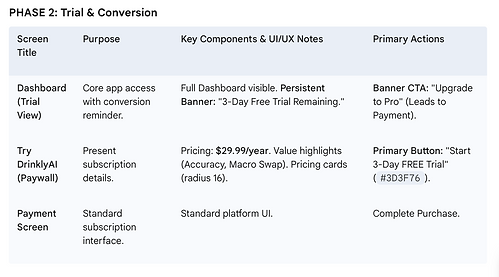
- Try DrinklyAI ,Start your 3 day FREE trail to continue,
-Payment,
-Dashboard,
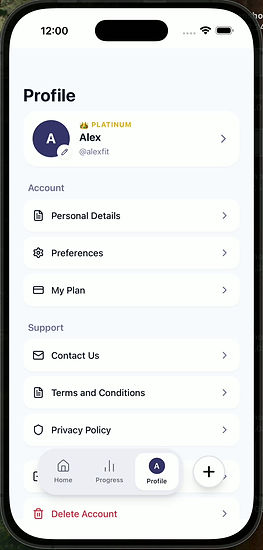
-My Profile
Design Instruction:
Use the uploaded design file as the visual reference. Follow consistent spacing, clean
alignment, responsive layout, and smooth navigation transitions.
Analyze images (the design) for overall style, color palette, and component design to
ensure consistency across all screens.
The page should be clean, professional, and minimalist with ample white space and
balanced padding for readability.
Use DrinklyAI logo for the app icon and splash screen use the uploaded logo, logo
color Black and white.
Main buttons- Primary Button color and all dark colors and text use our primary color
#3D3F76- and Sub text Use #8283A8- For Primary buttons use color-#3D3F76 Card
background color and secondary button -smaller - use #F3F1FF.
Cards used in this application- will have corner radius of 16.
Maintain a clean, trustworthy aesthetic suitable for a professional AI-powered
calorie tacker application.
Note- I will upload images so you can use the inspiration from the screens the
screens are for food if you have to use anything from the screens make sure to
update it to drinks.(since our app focuses on drinks)
Goal:
DrinklyAI is an AI technology with smart way to understand our drinks better and
know our drinks smarter with the power of AI
To create a great application powered by AI that tracks calorie in drinks and detect
what it consist of and generates recommendations based on their personality and
preferences. create a solution using DrinklyAI to solve the difficult problem of
volume and ingredient detection with high accuracy.
We focus on drinks this is our niche — also we have to solve the technical difficulty
of recognizing drinks + estimating hidden calories (sugar, alcohol, mix).
Combine image recognition (to detect container shape, color) + OCR (for reading
labels) + voice / text input to disambiguate.
Let users correct / confirm: after the app guesses what the drink is, you ask “Did you
add sugar / milk / flavoring?” to improve accuracy.
The main issue with liquid calories is that they often fail to trigger the same powerful
satiety (fullness) response as solid food. For a drink like a custom coffee or a cocktail,
it's nearly impossible for a user to guess the macros:
Our AI app that can detect these ingredients/volumes and provide a near-perfect
macro breakdown solves this core accuracy issue for the user.We have to track
calories or ingredients in mixed drinks, which is our core feature.
For Aicholic drinks we have to track on alcohol units, and the total caloric and sugar
breakdown of a complex cocktail or mixed drink. our strength should be accuracy and
detailed nutrient tracking, which is what our AI would need to deliver. focusing on AI
photo, text and voice inputs.
Our differentiating features should be:
"Photo Scan" ‘’Text’’ or ‘’Voice Record’’ Accuracy: The ability to accurately estimate
liquid volume (and therefore calories) in a non-standard glass from a single photo.
Ingredient Disaggregation: Identifying the components of a complex, mixed liquid
(e.g., espresso shot, steamed milk type, syrup flavor/pump count) and providing a
breakdown.
Real-Time Recommendations: Giving instant, highly contextual feedback like: "That
smoothie is 650 calories. Tap here to log a 350-calorie version with protein powder
and unsweetened almond milk."
The app will have a 3 day free trial and in app purchase with $29.99 per year
($2.49/mo)
Our app AI app should not just track the macros; it should provide the context that
makes macro counting for drinks successful: Macro Breakdown: Show the Protein,
Carb, and Fat grams clearly. Highlight Added Sugar: Make the refined carbohydrate
(sugar) count highly visible, as this is the primary villain in many drinks.Offer a
"Macro Swap" Feature: For high-carb/high-fat drinks, recommend a replacement that
preserves the protein or lowers the total caloric load (e.g., "Swap for a $10 \text{ g
Protein}$ $200 \text{ cal}$ version").
Alchol: In DrinklyAI if a user scans for an alcoholic drinks in a popup ask ‘Hi is this
is an alcoholic drink? Please confirm.’ with Yes or No button and if no ask them
‘Thank you for confirming so what is this dink?’ show two buttons microphone and
pencil icons and user can text or write. confirm and continue. If yes and user is under
21 years of age at the time of scan do not show results of the photo, text or voice, let
the user know that ‘You are not 21 and older, I am not able to provide this for you
thank you.’’ And just a close button. also remove the drink they have scanned.
The application will have a Light and dark mood option on the splash screen and on
the dashboard- so users can have both options.
Depending on the user input during on boarding show all results of any amounts by
Lb or Kg as.
Visual Solutions
Mockups
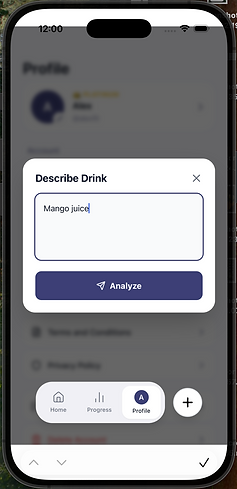
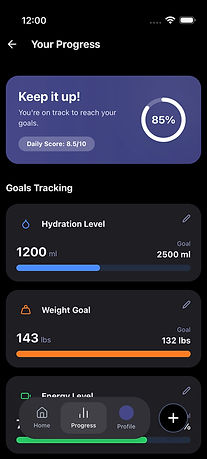
In the beginning ideation stage the Plus icon was hidden where users has to go deep to find it, it was planned to have its own page, To solve the discoverability issue, we extracted the icon and put it right in front of the user to the navigation menu sections.
After making this change, we observed that Customers mostly click the plus icon section and into other areas without any problem.
This was a great solution that the team was divided on first. In the end, we were willing to live with this experience.
I have changed the landing page to simpler screen, i created a space so that the page will have a room to breathe , importantly return and one way can be spotted clearly,
i use a darker image as a background so that the main text fields can be seen clearly,
i enlarged the size of the button, and changes on the text.
And i changed one of the bottom navigation to something functional which users interact most,
so settings was not that important in this app and i replaced it with profile.
I have created a visible text and a clear image so that anyone can see it from any mobile device and communicate with the app.
Organizing items by creating a group to the listed items in the app is the best solution we came across in order to minimize time and effort of users that might frustrated using the app.
I have created a page to track the daily drinks and also put accurate and updated information on all the items, plus I will create readable short text to the terms and conditions.
Continued creating the tactile representation of the app by building the UI elements and the visual design including typography, color, icons, button, space the feel and mood of the website in to a high fidelity mockups and a prototype which is ready to test.
I came up with an idea of a simple landing page where users will have a space when opening the app.


Accessibility
DrinklyAI is built with a strong commitment to accessibility, because accessible design is essential for everyone. Designing with accessibility in mind creates better experiences, removes barriers, and empowers all users—regardless of ability—to stay informed, productive, and connected.
Accessibility benefits people with permanent, temporary, and situational disabilities, all of whom may experience different forms of limited mobility or interaction challenges. I have intentionally integrated accessibility principles into every part of DrinklyAI so it can be used by people with disabilities as well as by all users equally.
The app’s design and content follow the Web Content Accessibility Guidelines (WCAG) to the best of my knowledge to ensure the product is:
-
Perceivable – content can be easily seen or heard
-
Operable – navigation supports touch, type, or voice
-
Understandable – instructions and language are clear and simple
-
Robust – compatible with a wide range of assistive technologies
To support these goals, DrinklyAI includes features such as text input, voice input, and clearly visible UI elements. I applied accessible text sizes, high color contrast, focus states, grouped content, and multiple visible indicators to ensure everyone can use the product comfortably.
Ultimately, inclusive design is good design, and accessibility is at the heart of that. DrinklyAI is created to support all users—because accessibility is for everyone.
AI detection problem and solutions
When DrinklyAI first designed only to take pictures of drinks and tell users what is in the drink- after ideation and design work we start to think a solution for a problem where the AI may not understand everything, this is where we came in to a solution that users may need to train the AI and correct what the mirin is , this way user will have a great application that approximate be very close to 80 to 90 percent. That's where the edit button came to play where users can edit what the camera captures.
The difficulty in accurately detecting and analyzing drinks for an AI comes down to three main technical and biological problems: Opacity/Composition, Volume Estimation, and The "Hidden Calorie" Problem.
1. The Opacity and Composition Challenge
Unlike solid food, where boundaries are clear, liquids are homogenous mixtures that hide their components.
-
Mixed Ingredients: A single photo scan of a cocktail (like a margarita) or a custom coffee (like a latte) looks uniform. The AI must infer the presence and proportion of base ingredients (e.g., espresso, type of milk, alcohol) that are visually indistinct.
-
Layering and Viscosity: Different layers (like foam or crema) or varying viscosities (syrup sinking to the bottom) complicate image analysis, making it hard to use computer vision alone to separate ingredients.
-
The "Unknown Base": A glass of clear liquid could be water, clear soda, vodka, gin, or clear tonic. The AI requires OCR (reading labels) or user text/voice input to correctly disambiguate the base fluid, which is why your app uses a multimodal approach.
2. The Volume and Container Estimation Problem
Accurately calculating calories hinges on knowing the exact volume, which is extremely difficult with non-standard containers.
-
Non-Standard Vessels: Unlike standardized cups, drinks are served in various glasses, mugs, or oddly shaped bottles (e.g., a hand-blown glass, a large smoothie cup). The AI must perform complex Volume Estimation (as noted in your features) by recognizing the container shape and measuring the liquid fill line against the container's known capacity.
-
Perspective and Angle: A photo taken from a slight angle or close-up can dramatically skew the AI's calculation of the liquid depth and volume, leading to major calorie errors. The AI needs calibration/depth sensing, which is inherently hard in 2D images.
3. The "Hidden Calorie" (Macro Disaggregation) Problem
The primary difficulty with liquid calories is that the most calorie-dense ingredients are often added post-pour or are invisible (sugar and alcohol).
-
Added Sugar: Refined sugar (the "primary villain") or high-fructose corn syrup dissolves completely and is visually undetectable. The AI must prompt the user ("Did you add sugar / milk / flavoring?") because there is no way for computer vision to confirm 3 pumps of syrup vs. 1.
-
Alcohol Content: Alcohol is calorie-dense (7 calories/gram) and visually identical to water. For a complex cocktail, the AI must not only identify the drink type but also estimate the specific alcohol proof and pour size to calculate alcohol units and total calories, which requires external data lookup.
-
Satiety Failure: The lack of fiber or chewiness in liquids means the calories are often overlooked by the user and fail to trigger the feeling of fullness, reinforcing the need for the AI to provide visible, detailed macro context.
Solving the Opacity and Hidden Ingredient Challenge
The core solution is relying on the multimodal input and making the AI's best guess easily correctable by the user.
Interactive Refinement Toggles (On the AI Analysis & Correction screen). Instead of free text, use clean, toggle-based questions: e.g., "Milk Added?", "Syrup/Flavoring?", "Sweetener?".
Ingredient Disaggregation Model: AI uses image data to identify likely category (e.g., "coffee beverage"). It then uses external API data to present the most common mixed components (e.g., espresso, skim milk, vanilla syrup) and pre-populates the refinement fields.
For Photo Scan: If the AI confidence is below a threshold, trigger the Text/Voice Input modal immediately after the photo: "I see a clear liquid. Please tell me what it is."
Solving the Volume and Container Estimation Problem
The solution requires the AI to use context clues from the photo and utilize user guidance for better measurements.
Calibration Anchor: During the photo scan, prompt the user to briefly include a known object (like a coin or credit card) for a few seconds.
The AI can use this for scale to improve 3D depth and volume calculation.Computer Vision Volume Model: Train the model on hundreds of unique glass/cup types. The model identifies the vessel (e.g., "Pint Glass," "Mason Jar") and uses its known geometry and the liquid line to estimate volume more accurately than simple 2D analysis.
Guided Photo Tool: Implement an overlaid frame in the camera view instructing the user to center the drink and hold the phone at a slightly elevated, consistent angle (e.g., a 45-degree guide).
Solving the Hidden Calorie (Macro Disaggregation) Problem
The solution is to make the caloric information and healthier alternatives immediately obvious and actionable.
CRITICAL Macro Card Highlight: As defined in the blueprint, use a high-contrast visual treatment (e.g., red or bold font) and position the Added Sugar count immediately below total Carbs on the AI Analysis & Correction screen.
Conditional Macro Swap Logic: The recommendation engine runs an instant calculation: If (Calories > 400 OR AddedSugar > 30g), then Generate_Swap_Option(). This logic drives the Real-Time Macro Swap feature.
Gated Process: The Alcohol Confirmation Gate (custom modal) ensures compliance and accuracy by forcing a specific, separate flow for alcoholic drinks, allowing the AI to calculate Alcohol Units and factor in the additional 7 cal/gram into the total macro count.